
.png)
Description
Download What the Chef – AI Recipe Generator, Free Cooking App
Why “What the Chef!?” Is Changing Home Cooking
In an age where food waste is a growing concern and busy lifestyles leave little time for meal planning, What the Chef!? emerges as a smart, AI‑driven solution that transforms the way home cooks decide what to eat. Powered by advanced language‑model algorithms, this web‑based application scans the ingredients you already have, matches them against an ever‑growing database of global cuisines, and instantly proposes creative, delicious recipes. Whether you’re a novice looking for a quick dinner or a seasoned foodie craving a culinary adventure, the platform delivers tailored suggestions that respect your pantry, your budget, and your taste preferences.
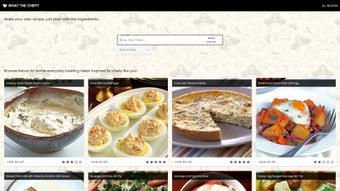
The core mission of What the Chef!? is to minimize food waste while maximizing flavor. By encouraging users to use up what’s on hand, the tool reduces the impulse to buy unnecessary items, saving both money and the environment. Its intuitive interface showcases each suggested dish with vibrant images, concise descriptions, and a community‑driven star rating system, allowing you to gauge popularity and success before you start cooking. The inclusion of the whimsical “Royal Meat Pie” demonstrates the app’s ability to blend classic comfort food with unexpected twists, proving that AI can be both practical and playful in the kitchen.
Beyond simply offering recipes, the platform acts as a personal culinary assistant. You can explore a vast library categorized by meal type—breakfast, lunch, dinner, snacks—and cuisine—Italian, Thai, Mexican, and more. If you prefer a hands‑on approach, you can manually select the ingredients you have, set your preferred cooking style (quick, healthy, gourmet), and let the AI generate a custom menu just for you. This flexibility, combined with clear step‑by‑step cooking instructions and estimated preparation times, makes meal planning less of a chore and more of an exciting discovery process.
Key Features and Step‑by‑Step Usage Guide
Feature List
- AI‑powered ingredient matching that creates recipes from whatever you have on hand.
- Extensive recipe library organized by meal type, cuisine, dietary restrictions, and cooking time.
- Visual recipe cards with high‑resolution photos, star ratings, and user comments.
- Custom recipe builder – select ingredients, set cooking style, and generate a unique dish.
- Estimated preparation & cooking times displayed for each recipe.
- Nutrition preview (calories, macros) for health‑conscious users.
- Save favorite recipes to a personal collection for quick access.
- Responsive web design – works seamlessly on desktop, tablet, and mobile browsers.
- Regular updates that add new cuisines, seasonal ingredients, and cooking techniques.
- Secure, privacy‑first data handling – no personal data is sold or shared.
Installation & Usage Instructions
Getting started with What the Chef!? is intentionally frictionless. Since it’s a web application, there’s no need to download bulky installers or manage updates manually. Follow these simple steps to begin cooking smarter:
- Visit the official site: Open your preferred browser and navigate to whatthechef.com. The site automatically detects your device and loads the optimal layout.
- Create a free account (optional): While you can browse recipes anonymously, registering allows you to save favorites, track your cooking history, and receive personalized recommendations.
- Input your pantry items: Click the “My Ingredients” tab, then either type items manually or use the voice‑input feature (available on supported browsers). You can also scan barcodes using your phone’s camera for instant entry.
- Select cooking preferences: Choose from filters such as “Quick (<30 min)”, “Healthy”, “Vegetarian”, or “Gourmet”. This helps the AI narrow down suitable recipes.
- Generate recipes: Press the “Find Recipes” button. Within seconds, a list of tailored dishes appears, each with a thumbnail, rating, and brief description.
- Explore recipe details: Click on a dish to view the full recipe card. You’ll see ingredient quantities, step‑by‑step instructions, cooking tips, and a nutritional snapshot.
- Start cooking: Follow the clear instructions, set timers as suggested, and enjoy your meal. Afterward, rate the recipe and leave feedback to help the community.
Because the platform runs entirely in the cloud, updates are applied instantly. New recipes, improved AI models, and UI enhancements appear without any action required on your part, ensuring you always have the latest cooking intelligence at your fingertips.
Compatibility and System Requirements
One of the biggest advantages of What the Chef!? is its universal accessibility. Built with modern web standards (HTML5, CSS3, and JavaScript), the application runs on virtually any device that can access the internet. Below is a breakdown of the supported operating systems and browsers:
- Windows 10/11: Works flawlessly on Chrome, Edge, Firefox, and Opera.
- macOS 11 (Big Sur) and later: Fully compatible with Safari, Chrome, and Firefox.
- Linux distributions: Chrome, Chromium, and Firefox provide optimal performance.
- iOS 13+ (iPhone & iPad): Safari and Chrome mobile apps deliver a responsive experience.
- Android 8.0+: Chrome, Firefox, and the native Android WebView render the site without issues.
The platform requires a stable internet connection to communicate with the AI backend and retrieve recipe data. For the best experience, a broadband connection (minimum 5 Mbps) is recommended, though the site also functions on 4G mobile networks. No additional plugins or extensions are needed, and the site adheres to WCAG 2.1 accessibility guidelines, ensuring it is usable for people with visual or motor impairments.
Security is a top priority. All data transmission is encrypted via HTTPS, and the service complies with GDPR and CCPA regulations, meaning your personal information stays private. Because the application is cloud‑based, there are no large file downloads, reducing the risk of malware and ensuring a lightweight footprint on your device’s storage.
Pros and Cons – A Balanced Look
What Users Love
- Zero cost: Completely free to use, with no hidden subscription fees.
- Instant recipe generation: AI delivers suggestions in seconds, saving time.
- Waste reduction: Encourages the use of existing pantry items, cutting food waste.
- Rich visual content: High‑quality photos and star ratings help choose appealing dishes.
- Customizable filters: Adaptable to dietary needs, cooking time, and skill level.
- Cross‑platform accessibility: Works on Windows, macOS, Linux, iOS, and Android.
- Community feedback: User ratings and comments improve recipe reliability.
- Regular content updates: New cuisines and seasonal recipes keep the library fresh.
Areas for Improvement
- Internet dependency: Offline usage isn’t possible; a connection is required.
- Limited advanced cooking techniques: The AI currently focuses on everyday recipes rather than complex gourmet methods.
- Voice input not universal: Only supported on browsers that allow microphone access.
- Ingredient database may miss niche items: Rare or regional ingredients sometimes aren’t recognized.
- Advertising: Light, non‑intrusive ads are displayed to support the free model.
Frequently Asked Questions
Is What the Chef! really free?
Yes, the core AI recipe generator and all standard features are completely free. The service is supported by non‑intrusive advertising, but there are no hidden subscription fees.
Can I use the app without an internet connection?
Currently, an active internet connection is required because the AI processing happens on remote servers. Offline functionality is being explored for future updates.
How does the AI know which recipes to suggest?
The AI analyzes the list of ingredients you provide, cross‑references them with a curated database of millions of recipes, and applies filters such as cuisine, cooking time, and dietary preferences to generate the most relevant options.
Is my personal data safe?
Yes. All data transmission is encrypted with HTTPS, and the platform complies with GDPR and CCPA. Personal information is never sold to third parties.
Can I contribute my own recipes?
Absolutely. Registered users can submit custom recipes, add photos, and receive community ratings, enriching the platform for everyone.
Conclusion – Start Cooking Smarter Today
What the Chef! stands out as a versatile, AI‑driven kitchen companion that bridges the gap between pantry inventory and culinary inspiration. By turning everyday ingredients into exciting meals, it not only helps you save money and reduce waste but also expands your cooking repertoire with minimal effort. The free, web‑based model ensures that anyone with an internet connection can benefit, while the responsive design guarantees a smooth experience on desktops, tablets, and smartphones alike.
If you’re ready to make mealtime less stressful and more adventurous, download What the Chef! now and let the AI guide you to your next delicious creation. Join the community, share your successes, and discover how a simple list of ingredients can become a feast for the senses.
Guides & Tutorials for What the Chef
How to install What the Chef
- Click the Preview / Download button above.
- Once redirected, accept the terms and click Install.
- Wait for the What the Chef download to finish on your device.
How to use What the Chef
This software is primarily used for its core features described above. Open the app after installation to explore its capabilities.
User Reviews for What the Chef 0
No reviews found




